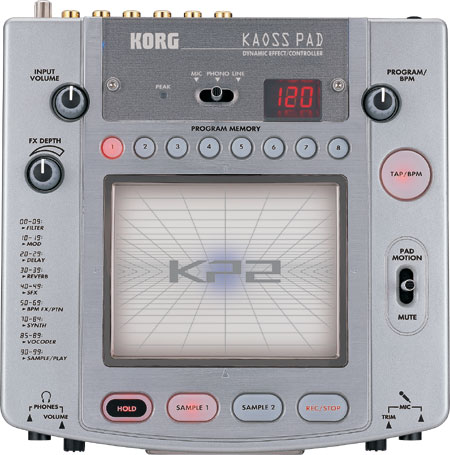
zelfde als de djm standaard filter, echo, reverb, etc etc etc, alleen hier kan je met je vinger overheen. www.korg.com heeft zelfs nog een filmpje beschikbaar over dit ding! ziet er heel gaaf uit, als je die wilt zien moet je zelf maar ff zoeken op de site, heb ik nu geen zin in
Ik ga persoonlijk echt helemaal voor de EFX500, we gebruiken dat ding hier nu een jaartje en het is echt perfect spul, solide .. je weet EXACT wat je doet, en daarnaast wat leuke extra dingetjes er op die hem voor mij iig een onmisbaar tooltje maken tijdens een leuke set.
Die grote bol aan de bovenkant bevat een infrarood straal. Door met je hand door die straal te gaan, kun je de effecten sturen. Net als op t Koaspad, maar dan zonder contact met t apparaat! 1 nadeel is dat in een donkere ruimte, je dichter bij t apparaat moet met je hand om de straal te doorbreken! De effecten reageren op de manier waarop jij je hand beweegt! Noise Supressor gebruikt t tijdens hun live optredens! Tis ongeveer niet groter dan een discman! Met het wieltje linksonder kun je dr effecten selecteren! Er zitten ongeveer 50 effecten in geloof ik! En een aantal standaard geluiden, zoals een windgeruis en zo!
Maar als je zelf zo een apparaat wil kopen. Zoek een winkel op die ze allemaal heeft en ga ze lekker uittesten! Tis een leuk verdrijf van de middag
Tja moet je doen he! Tis vooral leuk als je een "send en return" op je mixer hebt!
Dan hoef je m niet in je master op te nemen!
Die in- en uitgang zijn speciaal bedoeld voor effectmodules!
Ach, zowel de Pioneer, als de Chaospad en de Alesis zijn leuke speeltjes hoor! Lekker een beetje kloojen dr mee!
Nou die send en return voorkomt dat je de master moet loskoppelen!
Ik huur nix! Maar meestal worden die dingen voor een avondje gehuurd of zo. Ik ken iemand die een drive inn heeft en die heeft die pioneer eens voor 25 piek of zo gehuurd voor een avond!
dat heeft die Kaos Pad ook, die 's niet echt zuiver in het BMP uitrekenen...ik laat m'n djm meestal rekenen en dan stel ik dat handmatig in in de kaos pad...
Nou je moet anders nog wel die "TAP"-knop gebruiken om m te sequencen!
da's waardeloos als je zelf (moet) gaan tappen... je zit er altijd wel weer naast
moet dr ook nog maar ff zo'n dingetje bij halen denk ik..
waar sluit je zoiets trouwens op aan ?? heb nog nie bij verdere specificaties gekeken enz nl.
iemand die dr verstand van heeft ??
kun je m gewoon op n mengpaneel pluggen en de effects dr als t ware door heen mixen ??
Ik zelf werk met de efx 500 en ik vindt em super.
Moet er wel bij zeggen dat je hem uitgebreid moet testen om hem te gebruiken.Als je er iemand achter zte die er geen fuck mee kan doen dan loop je gillend weg
maar das nog geen antwoord op me vraag !!
ik weet dat dit t EFX500 topic is...
maar wil toch graag t 1 en ander weten over t kaos pad..(of de EFX500 als ie volgens jullie beter is) !!
bvd
3-BAND EQUALIZER
The high quality separate 3-BAND EQUALIZER (HI, MID. LOW) cuts sounds up to -oodB and almost completely silences the sound of instruments in each band.
ISOLATOR LEVER SWITCH
Momentary ON & LOCK ON method is adopted. The switch at the Momentary position returns to OFF when you takes your finger off the lever, allowing smooth ON-OFF changeover of effects. The switch, at the LOCK ON position, continues to be ON.
BEAT EFFECTS
Press the AUTO BEAT EFFECT button (1/4, 1/2, 3/4, 1/1, 2/1, 4/1) to produce live effects, DELAY, ECHO, AUTO PAN, AUTO FLANGER and AUTO TRANSFORMER, in linkage with beat set in advance.
This machine, with free selection of 3 bands (HI, MID, LOW), enables a wider range of performances than conventional effectors.
Turn the DEPTH and MIX knobs to change the depth of effects and the balance of the original sounds and effect sounds, respectively. In addition, normal effects, not linked with BPM, are possible.
You can set the beat by various methods such as AUTO, TAP, msec, BPM and MIDI BEAT.
EFFECT LEVER SWITCH
Momentary ON & LOCK ON method is adopted for smooth ON-OFF changeover.
AUTO BPM COUNTER
This counter automatically measures the BPM (Beats Per Minute) of music and turns it into digital indication. You can digitally confirm the BPM of input music sources.
TAP BUTTON
You can set BPM instantly by tapping the button with your finger. Press the button twice to input the tempo as desired.
EFFECT FREQUENCY
Button operation allows you to freely select specific frequency from the 3 bands (HI, MID, LOW) and produce effects. You can combine the bands as you like - for example, producing effects only in the MID (picture), or, conversely, selecting the LOW and HI for effects with the original sounds in the MID.
DELAY: You can set DELAY sounds at any tempo.
ECHO: You can set ECHO sounds at any tempo. Turn of the DEPTH knob to MAX produces HOLD DELAY effect, in which repeat continue when BEAT EFFECT is OFF.
AUTO PAN: You can automatically swing sounds to the right and left.
AUTO FLANGER: This produces a sound effect like when a jet plane ascends and descends periodically. The DEPTH knob can be used to change the strength of the waves.
AUTO TRANSFORMER: This cuts sounds periodically.
DIGITAL JOG BREAK
"Digital Jog Break" is equipped for producing new digital sounds on the spot.
A turn of the JOG DIAL controls 5 effects, JET, ZIP, WAH, RING MODULATION, and FUZZ.
The DEPTH knob can be used to freely set the strength and depth of effects as well as the balance of the original sounds and effect sounds.
You can enjoy a variety of DJ performances with an instrument-feel.
LEVER SWITCH
Momentary ON & LOCK ON method is adopted for smooth ON / OFF changeover.
JOG BREAK METER: This optically indicates the motion of the JOG DIAL and the change of sounds, allowing you to visually confirm the motion.
JET: This is a function to add SHORT DELAY. Turn of the JOG DIAL creates wave sounds, with the FLANGER effect made by using 2 analogue turntables.
ZIP: The JOG DIAL can be used to change the pitch of reproduced sounds without changing the tempo. Lowering of the pitch produces sounds resembling those made by slowing an analogue turntable.
WAH: This, is a function to change cut-off frequency. Turn of the JOG DIAL makes the sound of a certain instrument strong or weak. It feels like the sound is moving.
RING MODULATION: Modulation of sounds produces a tone like the ring of a bell, providing effects such as a cosmic sound or a robot voice.
FUZZ: This is a distortion effect on sounds. The JOG DIAL changes the distorted band.
HOLD FUNCTION
With the function on, the present state can be maintained if you stop turning the JOG DIAL. With the function off, it returns gradually to the state of the original sounds.
JOG DIAL MEMORY FUNCTION
This is a new function to memorize and reproduce the motion of the JOG DIAL. When you turn the JOG DIAL and simultaneously press the MEMORY button, the motion of the JOG DIAL is memorized for as long as 8 seconds. While pressing the PLAY button, you can replay the memorized action in all the 5 effects as many times as you want.
OTHER FUNCTIONS
The EFX-500 is equipped with MIDI IN/OUT terminals for controlling the CLOCK signal of MIDI instruments. The BPM of input analogue sound signal is measured automatically, converted to MIDI-CLOCK signal, and output so that the beats of connected MIDI instruments can be synchronized.
The EFFECT MONITOR SYSTEM monitors each of BEAT EFFECT, DIGITAL JOG BREAK, and master sounds. The volume & meter controls input/effect output levels. The auto-lighting, button indicates Rear Panel the setting of each effect. The compact size makes this machine portable
Input Channel 1 x Stereo
Input Terminal 1/4" phone (stereo) and RCA (stereo)
Output Terminal 1/4" phone (stereo) and RCA (stereo)
MIDI Terminal IN/OUT
Output Level Switch +4 dBu/-10dBu
Signal-to-Noise Ratio 80 dB or more
Frequency Response 20 Hz -- 20 kHz
3 Band EO (Low, Mid, Hi) oo - +6 dB
Effect Monitor (Headphone) Beat Effect
Master Out
Digital Jog Break
Net Weight: 5 Ibs.,8 oz.
(2.5 kg)
Dimensions (W xH xD): (10-7/18" x 2-1/2" x 8-11/16")
276 x 64 x 220 mm
zo als je er nog meer over wil weten kijk ff op http://www.pioneerprodj.com/cm/products/doc/efx500.pdf
Wel een min punt is dat er geen send & return op de XTC zit (heb een dateq), waardoor je je signaalkabel vanaf de EFX-500 moet splitten om gelijktijdig een mastersignaal en een recordsignaal te hebben.maar mocht je een mengpaneel hebben die dat wel heeft dan is het helemaal makkelijk
laatste aanpassing
zo voldoende
ja is wel voldoende ja..
maar waar sluit je t nou precies op aan dan ??
of is mn engels nou zo slecht
- als je mengpaneel send & return ondersteunt dan kun je hem lussen
- als je mengpaneel geen send & return ondersteunt dan moet je hem achter de masteruitgang hangen en kun je dus ook niet effecten per kanaal toepassen, alleen op het mastergeluid
Zelf heb ik de EFX-500 trouwens ook, nu een paar maanden, blijft een leuk speeltje om zo nu en dan je setje wat levendiger te maken.



 (in de techno afdeling
  )
)


 woeiiiiiiiiiiiiiiiiiiiiiii

 je zit er altijd wel weer naast


 Dit is geen cd speler hoor...
  Rob Acid en 't Kaospad !!

